Hexo


  • Home

  • Archives

learn sklearn(一)

Posted on 2018-03-05

使用sklearn的iris数据,用svm模型进行拟合并使用cross validation进行模型的选择和参数调优。

数据

sklearn中有大量的数据,保存在sklearn的datasets包中。sklearn的datasets包中提供了载入本地小数目数据(load_<dataset_name>函数),本地生成数据(make_<dataset_name>函数),网上下载公开的大数据集(fetch_<dataset_name>函数)。

加载本地数据

方法有:

1
2
3
4
5
6
7
8
9
10
11
12
13
14
15
datasets.load_boston([return_X_y])	Load and return the boston house-prices dataset (regression).
datasets.load_breast_cancer([return_X_y]) Load and return the breast cancer wisconsin dataset (classification).
datasets.load_diabetes([return_X_y]) Load and return the diabetes dataset (regression).
datasets.load_digits([n_class, return_X_y]) Load and return the digits dataset (classification).
datasets.load_iris([return_X_y]) Load and return the iris dataset (classification).
datasets.load_linnerud([return_X_y]) Load and return the linnerud dataset (multivariate regression).多变量线性回归 [Todo]
datasets.load_wine([return_X_y]) Load and return the wine dataset (classification).

#加载图片数据
datasets.load_sample_image(image_name) Load the numpy array of a single sample image
datasets.load_sample_images() Load sample images for image manipulation.

#加载非sklearn的数据(csr格式)
datasets.load_svmlight_file(f[, n_features, …]) Load datasets in the svmlight / libsvm format into sparse CSR matrix
datasets.load_svmlight_files(files[, …]) Load dataset from multiple files in SVMlight format

数据集文件在sklearn安装目录下datasets\data文件下。

以加载iris数据为例:

1
2
3
4
5
6
7
8
9
10
11
12
13
14
15
16
17
18
19
20
21
22
23
# 引入datasets
In [4]: from sklearn import datasets
# load iris数据集
In [5]: iris = datasets.load_iris()

In [6]: iris
Out[6]:
#所有iris数据集的属性可以通过iris.<AttrName>,其中最重要的两个属性是target和data,分别是数据的label(Y)和feature(X)值,feature_names和target_names是feature和label的名称。
{'DESCR': 'Iris Plants Database...',
'data': array([[5.1, 3.5, 1.4, 0.2],
[4.9, 3. , 1.4, 0.2],
[4.7, 3.2, 1.3, 0.2],
...
[6.2, 3.4, 5.4, 2.3],
[5.9, 3. , 5.1, 1.8]]),
'feature_names': ['sepal length (cm)',
'sepal width (cm)',
'petal length (cm)',
'petal width (cm)'],
'target': array([0, 0, 0,...]),
'target_names': array(['setosa', 'versicolor', 'virginica'], dtype='<U10')}

In [7]:

本地生成数据

方法有:

1
2
3
4
5
6
7
8
9
10
11
12
13
14
15
16
17
18
19
20
datasets.make_biclusters(shape, n_clusters)	Generate an array with constant block diagonal structure for biclustering.
datasets.make_blobs([n_samples, n_features, …]) Generate isotropic Gaussian blobs for clustering.
datasets.make_checkerboard(shape, n_clusters) Generate an array with block checkerboard structure for biclustering.
datasets.make_circles([n_samples, shuffle, …]) Make a large circle containing a smaller circle in 2d.
datasets.make_classification([n_samples, …]) Generate a random n-class classification problem.
datasets.make_friedman1([n_samples, …]) Generate the “Friedman #1” regression problem
datasets.make_friedman2([n_samples, noise, …]) Generate the “Friedman #2” regression problem
datasets.make_friedman3([n_samples, noise, …]) Generate the “Friedman #3” regression problem
datasets.make_gaussian_quantiles([mean, …]) Generate isotropic Gaussian and label samples by quantile
datasets.make_hastie_10_2([n_samples, …]) Generates data for binary classification used in Hastie et al.
datasets.make_low_rank_matrix([n_samples, …]) Generate a mostly low rank matrix with bell-shaped singular values
datasets.make_moons([n_samples, shuffle, …]) Make two interleaving half circles
datasets.make_multilabel_classification([…]) Generate a random multilabel classification problem.
datasets.make_regression([n_samples, …]) Generate a random regression problem.
datasets.make_s_curve([n_samples, noise, …]) Generate an S curve dataset.
datasets.make_sparse_coded_signal(n_samples, …) Generate a signal as a sparse combination of dictionary elements.
datasets.make_sparse_spd_matrix([dim, …]) Generate a sparse symmetric definite positive matrix.
datasets.make_sparse_uncorrelated([…]) Generate a random regression problem with sparse uncorrelated design
datasets.make_spd_matrix(n_dim[, random_state]) Generate a random symmetric, positive-definite matrix.
datasets.make_swiss_roll([n_samples, noise, …]) Generate a swiss roll dataset.

返回值是一个X,Y的tuple。
以make_classification为例,生成一个n分类的数据集。
函数原型:

1
sklearn.datasets.make_classification(n_samples=100, n_features=20, n_informative=2, n_redundant=2, n_repeated=0, n_classes=2, n_clusters_per_class=2, weights=None, flip_y=0.01, class_sep=1.0, hypercube=True, shift=0.0, scale=1.0, shuffle=True, random_state=None)

重要参数:
n_samples:样本数目
n_features:特征值数目
n_classes:类别数目
n_informative:有用feature的数量

1
2
3
4
5
6
7
8
9
10
11
12
13
14
15
16
17
18
19
20
21
22
23
24
25
26
27
28
29
30
31
32
33
34
35
36
37
38
In [21]: X, Y = datasets.make_classification(n_samples = 500000,n_features=20,n_classes=10, n_informative=15)

In [22]: X.shape
Out[22]: (500000, 20)

In [23]: Y.shape
Out[23]: (500000,)

In [24]: X[0:5,:]
Out[24]:
array([[ 4.20716048, 2.89816159, -2.22520281, 2.91608569,
-2.65978401, -0.58548034, -1.35236908, 1.45854599,
1.22915019, 0.83945602, -0.37039011, 1.51500123,
3.30974065, -3.72031774, -0.69192637, -0.42726318,
1.01004173, -2.14431752, -3.34576998, 1.41292011],
[ -4.22939888, -2.99845979, -0.16778885, -1.87307099,
-3.29458426, 0.87069235, 0.35871264, -0.1094688 ,
2.39924663, 1.65507134, 3.74740054, 0.52876375,
-11.20088226, -4.77106708, -1.10166238, -0.24131795,
2.73772299, 1.63735191, -7.44364439, 2.58440319],
[ 0.04585477, 1.02962404, -0.88752286, -1.53726562,
0.13273288, 1.25377358, 1.3764017 , -1.08588389,
-1.36256052, 0.59297559, 2.1830424 , 1.07222261,
-0.62803604, -1.62130681, 0.08642698, -0.51030915,
0.49853178, 1.70330411, -4.04308849, 0.69609419],
[ 1.09212846, -1.7176523 , 0.33377855, -0.73225257,
-0.25529192, 1.72512901, -2.74140273, -1.70123362,
0.8635851 , 0.26074242, -2.43043595, -0.0501557 ,
-3.23266432, 0.80834196, 1.0274291 , -0.82542901,
1.34949996, 0.62395031, -0.70523628, 4.29576291],
[ -1.03360432, -4.53231556, -0.11623221, -1.88667928,
4.48409721, -0.6291969 , -4.76071967, 0.32996626,
-4.86525783, -5.83460699, -4.82609817, 3.47267425,
-14.43950814, -0.53638362, 3.87523929, 0.84315801,
3.93050841, 3.10874535, -4.29160614, 3.59139518]])

In [25]: Y[0:5]
Out[25]: array([0, 7, 1, 4, 3])

网上下载数据

方法有:

1
2
3
4
5
6
7
8
9
10
11
datasets.fetch_20newsgroups([data_home, …])	Load the filenames and data from the 20 newsgroups dataset.
datasets.fetch_20newsgroups_vectorized([…]) Load the 20 newsgroups dataset and transform it into tf-idf vectors.
datasets.fetch_california_housing([…]) Loader for the California housing dataset from StatLib.
datasets.fetch_covtype([data_home, …]) Load the covertype dataset, downloading it if necessary.
datasets.fetch_kddcup99([subset, data_home, …]) Load and return the kddcup 99 dataset (classification).
datasets.fetch_lfw_pairs([subset, …]) Loader for the Labeled Faces in the Wild (LFW) pairs dataset
datasets.fetch_lfw_people([data_home, …]) Loader for the Labeled Faces in the Wild (LFW) people dataset
datasets.fetch_mldata(dataname[, …]) Fetch an mldata.org data set
datasets.fetch_olivetti_faces([data_home, …]) Loader for the Olivetti faces data-set from AT&T.
datasets.fetch_rcv1([data_home, subset, …]) Load the RCV1 multilabel dataset, downloading it if necessary.
datasets.fetch_species_distributions([…]) Loader for species distribution dataset from Phillips et.

下载下来的数据会放在~/scikit_learn_data目录下,如果想保存到其他的地方,可以传入data_home参数,作为下载的目标位置。

来源 sklearn

模型的选择与评估

sklearn官网给出的模型选择参考:
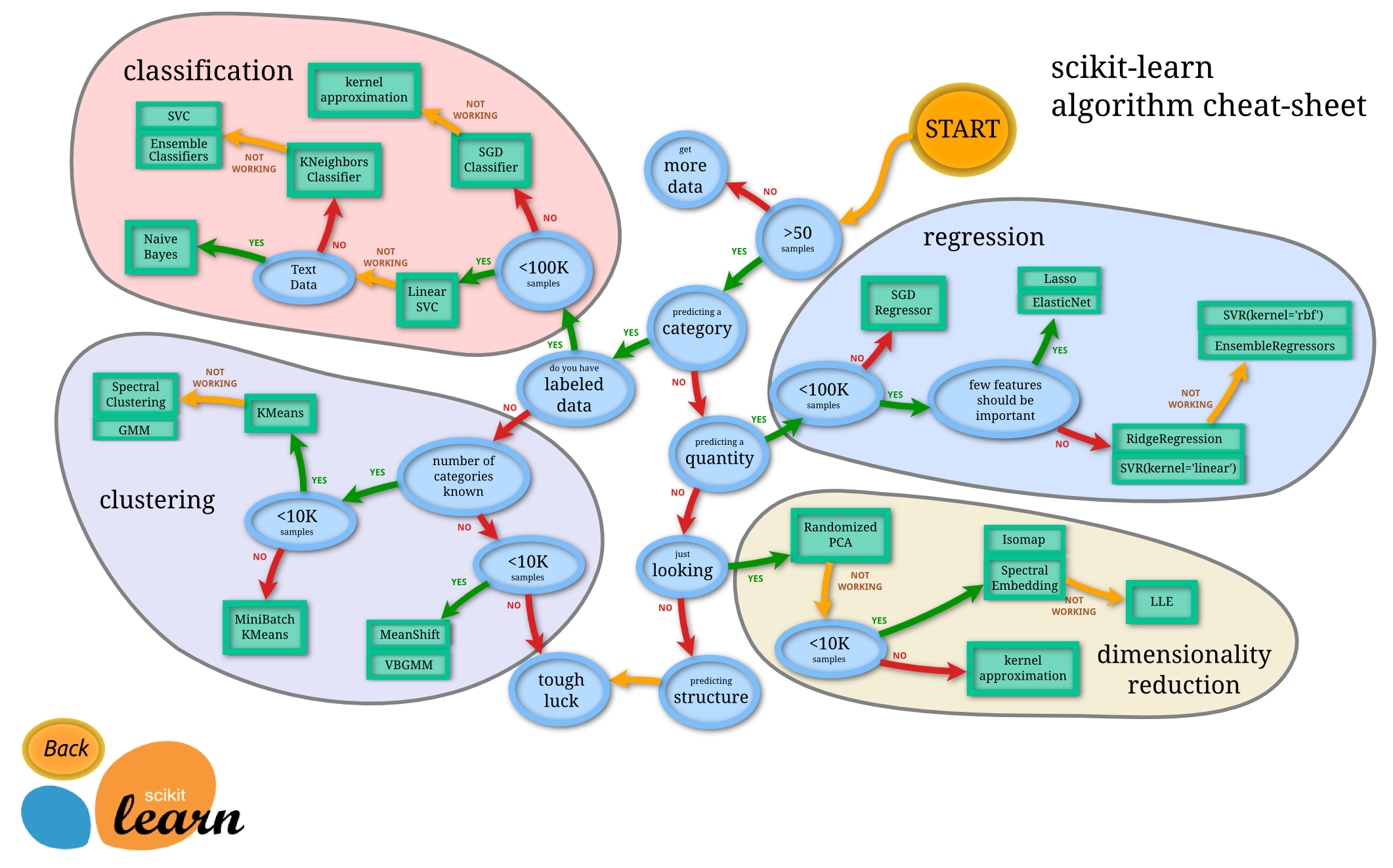
Model-Selection

常用模型


监督学习

常用线性模型

sklearn.linear_model中包含了sklearn的主要线性模型函数。主要包括Linear_Regression线性回归,Ridge岭回归,Lasso回归,BayesianRidge贝叶斯脊回归(用于回归问题的贝叶斯方法), LogisticRegression(逻辑回归),Stochastic Gradient Descent(SGD随机梯度下降法),Elastic Net (弹性网络回归)。

模型学习从三个角度理解:

  • The Hypothesis Function:假设函数,也就是用于最终预测新数据的函数。在线性回归中,为
  • $x^2$

    Linear_Regression

  • The Hypothesis Function:

loss function:

Ridge,RidgeCV

Lasso

[TODO]

BayesianRidge

[TODO]

LogisticRegression

SGD

Elastic Net

[TODO]
Support Vector Machines(支持向量机)

Stochastic Gradient Descent(SGD)

Navie Bayes(朴素贝叶斯)

Decision Tree(决策树)

Ensemble Methods(集成学习)

Neural Network

非监督学习

Clustering(聚类)

Jekyll的使用

Posted on 2017-10-19

Jekyll的简单介绍可以看使用Github Pages和Jekyll建立免费个人博客网站,然后我开始准备从头写一个Jekyll的博客。

1.安装Jekyll

使用Ubuntu 可以直接使用apt安装。

重装linux

Posted on 2017-10-18

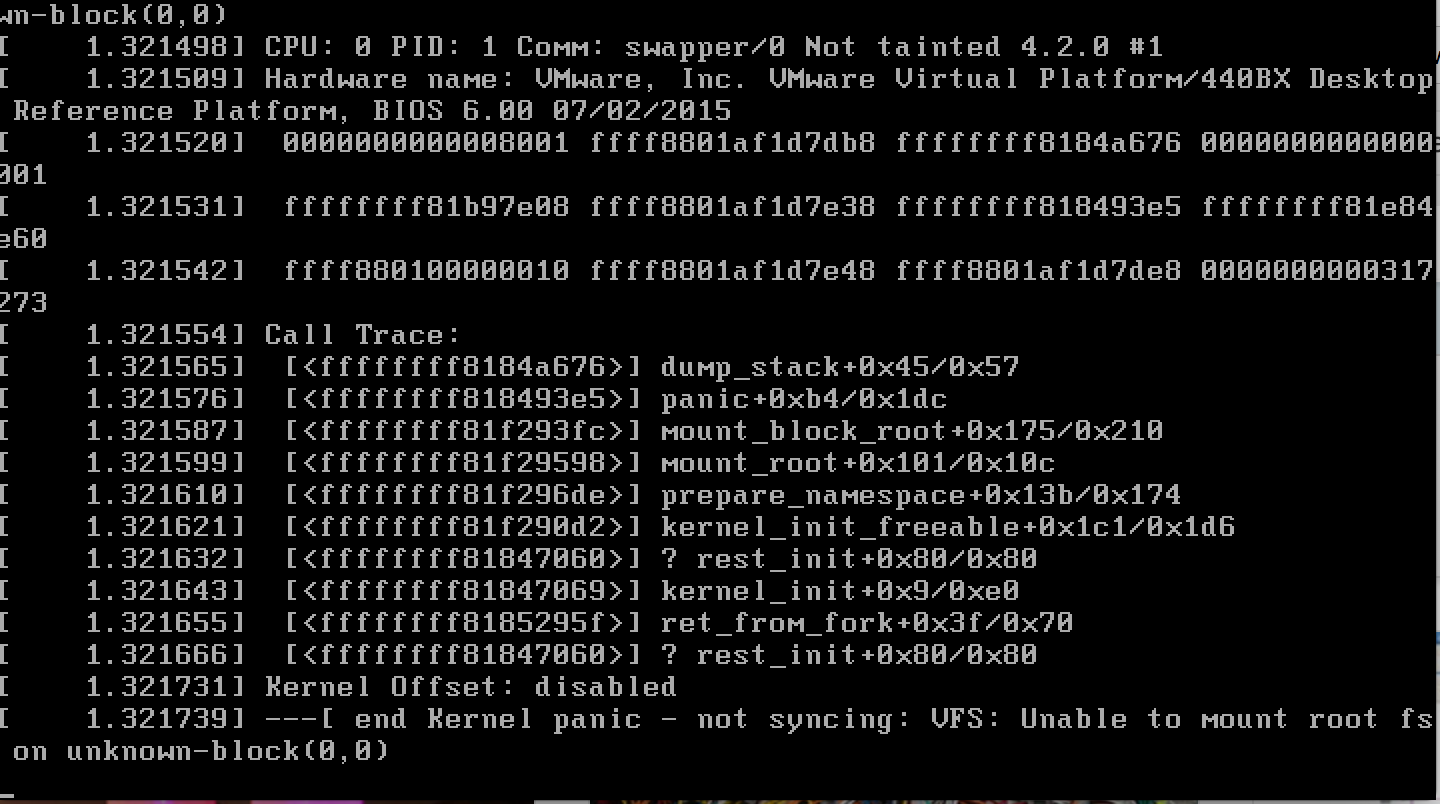
今天下午想使用Ubuntu的时候,突然发现Ubuntu系统进不去了,出现

1
Kernel Panic - not syncing: VFS: Unable to mount root fs on unknown-block(0,0)

Error

双系统中windows没有收到影响,但是Ubuntu确实怎样也进不去,只能进入grub中,但是对于grub又不了解,折腾了半天,断电了好多次,还是没有办法,只好重装系统了。前面也有次是这样的,不了解grub,不了解linux启动的顺序,导致只能重装系统,因此,这次教训之后,准备认真了解一下grub和linux启动的顺序原理。

了解Grub

1
2
3
4
5
6
7
8
9
10
11
12
13
14
15
16
17
grub rescue>root=(hd0,x)

grub rescue>prefix=/boot/grub

grub rescue>set root=(hd0,x)

grub rescue>set prefix=(hd0,x)/boot/grub

grub rescue>insmod normal

rescue>normal -------->若出现启动菜单,按c进入命令行模式

rescue>linux /boot/vmlinuz-xxx-xxx root=/dev/sdax

rescue>initrd /boot/initrd.img-xxx-xxx

rescue>boot
  1. insmod [module]
    Insert the dynamic GRUB module called module.

按照需要加载grub的动态模块.例如:

1
initrd normal

内核版本号 -xxx-xxx可以按Tab键查看后再手动补全。

加载normal模块[需要normal.mod模块在目录grub/i386-pc下]。

  1. root=/dev/sdax root (hd0,1)

root 通常是指主 Linux 分区,将后面这些分区设为linux主分区。

  1. linux

Load a Linux kernel image from file. The rest of the line is passed verbatim as the kernel command-line. Any initrd must be reloaded after using this command (see initrd).
从文件中加载一个linux的镜像,这一行之后的命令都会按照字面意思被当做内核命令运行,比如说这里设置root=/dev/sdax,将/dev/sdax当做设备主分区。initrd必须在linux/kernel命令之后执行。

  1. initrd /boot/initrd.img-xxx-xxx

Load an initial ramdisk for a Linux kernel image, and set the appropriate parameters in the Linux setup area in memory. This may only be used after the linux command (see linux) has been run. See also GNU/Linux.
加载Linux格式的初始化虚拟盘。

  1. kernel /vmlinuz root=/dev/hda5

    尝试载入主引导影像文件。其它项将被作为内核的命令行参数而传递给内核。使用此命令以前,内核所用到的模块应该被重新载入。
    Vmlinuz是内核。它从GRUB的根文件系统载入的,如(hd0,0),(hd0,5)。同时,后面一个选项被传给内核。这里它指出当Linux内核载入时,内核的根文件系统应该是位于hda5,第一个IDE硬盘的第五个分区。

  2. chainloader +1

Load file as a chain-loader. Like any other file loaded by the filesystem code, it can use the blocklist notation (see Block list syntax) to grab the first sector of the current partition with ‘+1’. If you specify the option –force, then load file forcibly, whether it has a correct signature or not. This is required when you want to load a defective boot loader, such as SCO UnixWare 7.1.
将指定的文件作为一个链式装载程序载入。为了获取在一个指定分区第一 扇区内的文件,使用+1作为文件名。这个命令一般在装在windows系统的时候使用,因为像linux ,kernel命令,加载的就是系统镜像,但是windows系统加载进来的部分就有自身的引导程序,所以,接下来的交给windows引导程序完成加载。

  1. boot

引导先前已经被指定并载入的操作系统或链式装载程序。

Grub修复引导

遇到不能进入系统,但是系统文件都没有什么问题的,可能只是引导项出问题了,比如说分区变更了或者uuid不对了,这个时候只需要使用grub重建引导项,分两种情况:

  1. 只能够进入 grub rescue模式:

寻找到linux系统的位置,假设为(hd0,msdos7),那么可以设置linux的主分区 1,2行,然后找到grub,设置prefix,3,4行,之后加载grub的normal模块,这样,就能够进入到grub的正常模式(6行)。

1
2
3
4
5
6
grub rescue>root=(hd0,msdos7)
grub rescue>prefix=/boot/grub //grub路径设置
grub rescue>set root=(hd0,msdos7)
grub rescue>set prefix=(hd0,msdos7)/boot/grub
grub rescue>insmod normal //启动normal启动
grub rescue>normal

进入grub模式后,进入2。

  1. 进入grub模式
1
2
3
4
5
6
按c键进入命令指示符模式
grub >set root=hd0,msdos7
grub >set prefix=(hd0,msdos7)/boot/grub
grub >linux /vmlinuz-xxx-xxx root=/dev/sda7 //里边的xxxx可以按Tab键,如果有acpi问题,在最后加一句acpi=off
grub >initrd /initrd.img-xxx-xxx
grub >boot

1行设置linux的主分区,2设置grub的路劲,3,4行负责加载linux的镜像,最后引导。

搭建个人网站之路

Posted on 2017-10-17

看到阮一峰大神的2012中的Blog中有着一段:

第一阶段,刚接触Blog,觉得很新鲜,试着选择一个免费空间来写。
第二阶段,发现免费空间限制太多,就自己购买域名和空间,搭建独立博客。
第三阶段,觉得独立博客的管理太麻烦,最好在保留控制权的前提下,让别人来管,自己只负责写文章。

自我感觉了一下,昨天才建立好自己的blog,第一阶段的孩子兴致冲冲想来写一篇blog,这不,刚好可以写写怎样使用github Pages和Jekyll建立一个免费的个人博客网站。

github Pages和Jekyll介绍

我们都知道github是一个代码托管网站,从个人到大公司都可以将开源项目放在上面托管,简直就是程序员们的天堂,妈妈再也不用担心我代码写不出来了。但是如果紧紧是代码放在上面,没有交流讨论,开源就失去了它的价值了,而想要交流就必须先了解,因此除了README文件之后,github还推出了github pages项目。通过github pages项目可以将项目内容通过正常的网页展示,并给出一定的介绍,相当于代码和人类思维之间的润滑剂,让你可以在不看完代码之前可以对项目功能,各部分作用之间有一定了解。由于gitgithub pages给你pages允许用户自定义项目首页,用来替代默认的源码列表,所以,github Pages可以也被认为是用户编写的、托管在github上的静态网页,并且有意思的一点是,你的源码传上去之后,github可以内置的模板解析网页,也可以不使用内置的,而使用Jekyll生成网页再展示。

Jekyll(发音/‘dʒiːk əl/,”杰克尔”)是一个静态站点生成器,它会根据网页源码生成静态文件。它提供了模板、变量、插件等功能,所以实际上可以用来编写整个网站。当然现在静态站点生成器还有比如Hugo,Hexo等。

说人话就是,如果把搭建blog比喻为唱戏,那么github pages给你提供免费的场地,而Jekyll给你提供唱戏所需要的戏台,给你服装,而你只需要专注于唱戏,也就是写blog。

使用github pages。

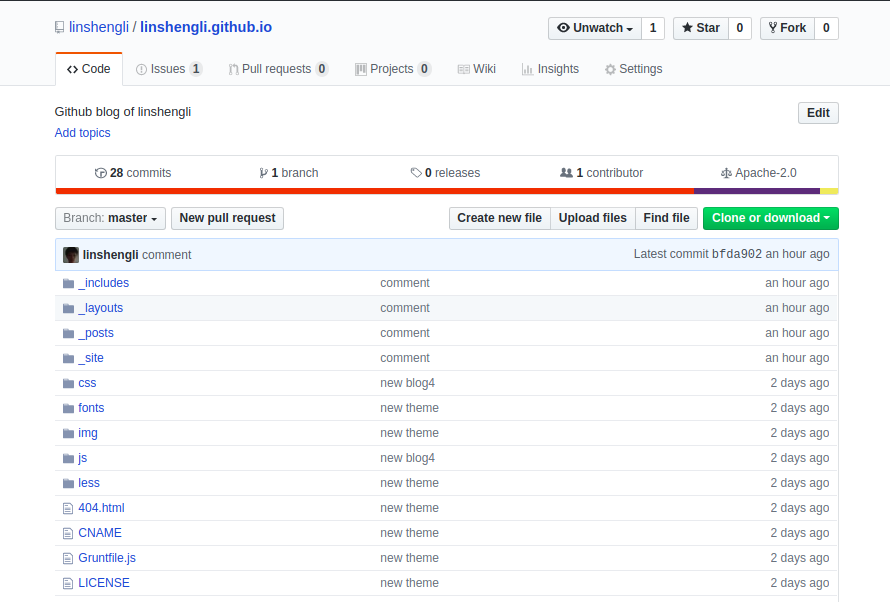
那么首先我们要先找场地。首先在github上创建一个项目,如果你在github上的ID为abc,那么创建一个abc.github.io的项目。比如:github_pages
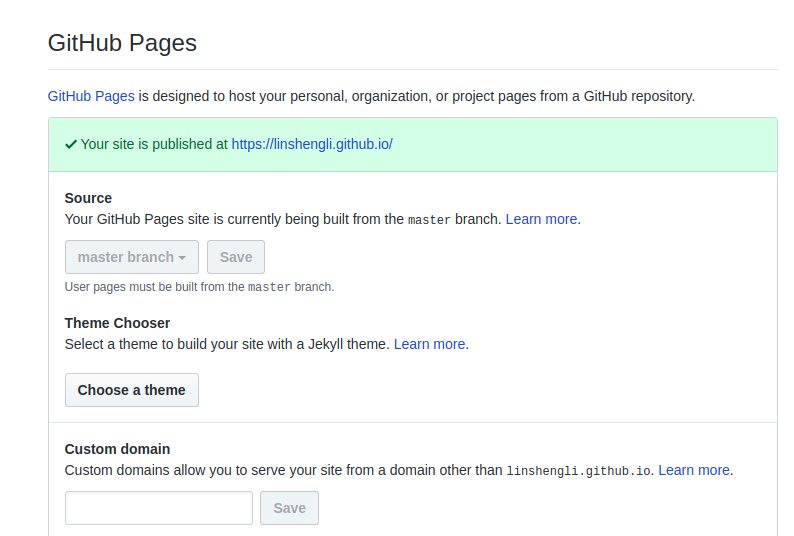
我的ID为linshengli,因此创建了一个linshengli.github.io的项目,然后,设置该项目的github pages:setting->github pages中设置source为master branch。github_pages_1至此,我们已经将github pages的大半事情做好了,接下来,你可以进入abc.github.io,看到的大概是github_pages_2至此,大概可以理解为戏台已经搭建好了。
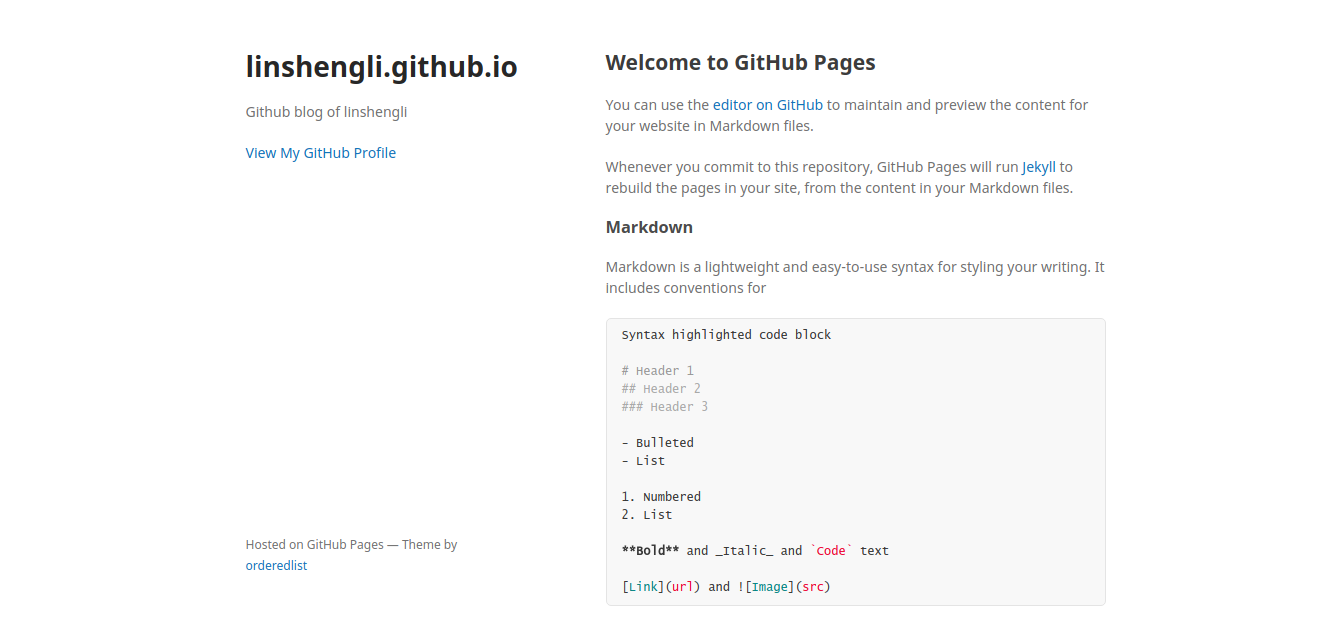
使用Jekyll生成器

接下来我们来准备写blog需要的一些其他东西。因为我们的blog肯定是使用文本编辑器在本地写好之后,推送到github的仓库中去,然后,github的Jekyll生成器根据我们项目文件生成我们的blog的网页。而比如说blog的功能,样式,我们都可以通过Jekyll的非正文内容配置得到。

博客主题

博客的主题和功能必定为大家很在意的一点,这些我们都可以通过下载适当的Jekyll模板实现。推荐一下主题:

  • jekyllthemes.org
  • Github-Jekyll
  • Jektyll 模板

在找到一个理想的主题之后,首先我们将我们创建的仓库和喜欢的主题clone到本地:

1
2
git clone XXXX.github.io[你的项目地址]
git clone XXXX.github.io[你喜欢的主题]

可以看到Jekyll主题的项目结构是这样的:

1
2
3
4
5
6
7
8
9
10
11
12
13
├── index.html
├── _config.yml
├── assets
│ ├── blog-images
│ ├── css
│ ├── fonts
│ ├── images
│ └── javascripts
├── _includes
├── _layouts
├── _plugins
├── _posts
└── _site
  • _config.yml:是我们的配置文件,决定了 Jekyll 如何解析网站的源代码。
  • _layouts:这个目录存放着一些网页模板文件,为网站所有网页提供一个基本模板,这样 每个网页只需要关心自己的内容就好,其它的都由模板决定。
  • index.html:是网站的首页,访问 http://username.github.io时,会指向http://username.github.io/index.html。
  • _posts:这个目录存放我们的所有博客文章。

书写Blog

然后,你就可以在_posts中新建文件blog书写了,完成之后,将所有文件上传到github上

1
git push origin master

之后,再访问abc.github.io,就是你的blog了。

参考文章

  • https://www.tuicool.com/articles/BVVBvu [详细]
  • http://www.ruanyifeng.com/blog/2012/08/blogging_with_jekyll.html [推荐]
  • http://www.cnblogs.com/purediy/archive/2013/03/07/2948892.html [推荐]
  • https://zhuanlan.zhihu.com/p/25744686 [参考]
  • http://www.jianshu.com/p/05289a4bc8b2 [参考]
  • https://help.github.com/articles/using-jekyll-as-a-static-site-generator-with-github-pages [参考]
12

Tbxsx

14 posts
19 tags
© 2018 Tbxsx
Powered by Hexo
|
Theme — NexT.Pisces v5.1.4